 Español
 English
 Português
The driver’s workday, connected to your fleet
Start of shift, pre-trip inspection, Hours of Service, documents and incidents on the driver’s phone. And it all ties in with the data from the GPS trackers already installed in your trucks.
- Fewer calls to dispatch
- Paperless inspections
- GPS-verified mileage
- Works offline
Fewer calls, less paperwork and data you can trust
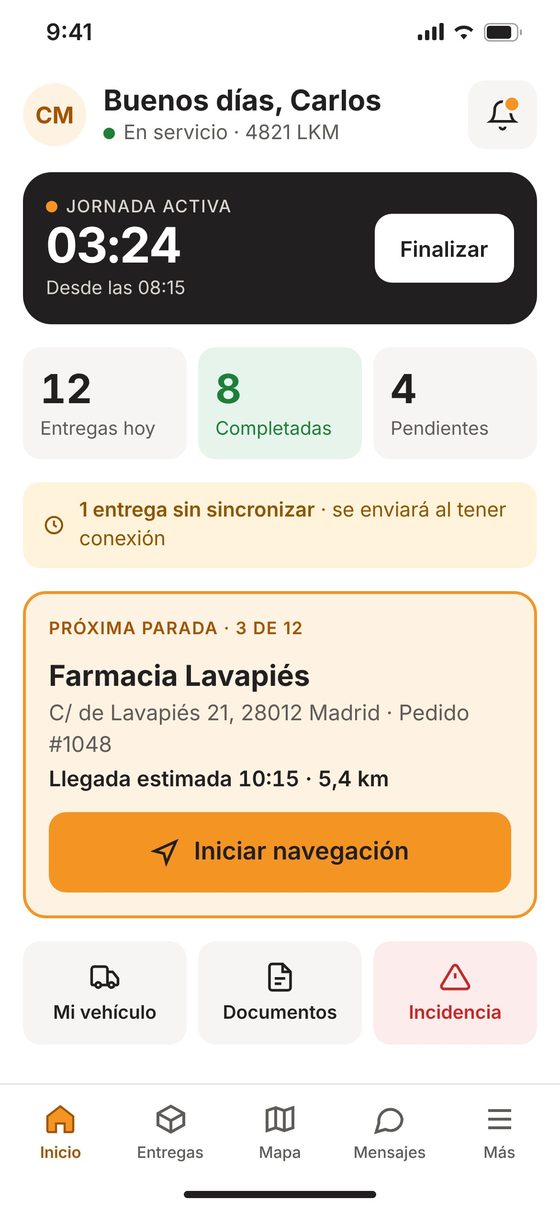
Dispatch always knows which vehicle each driver has, the odometer reading it left with, whether it passed inspection and what has happened on the road. Drivers get everything they need for the day in one app.
Vehicle assigned by dispatch
The driver sees the vehicle dispatch has assigned. Vehicles in the shop can’t be selected.
Verified mileage
Starting mileage comes from the tracker. If it doesn’t match, the driver has to explain why.
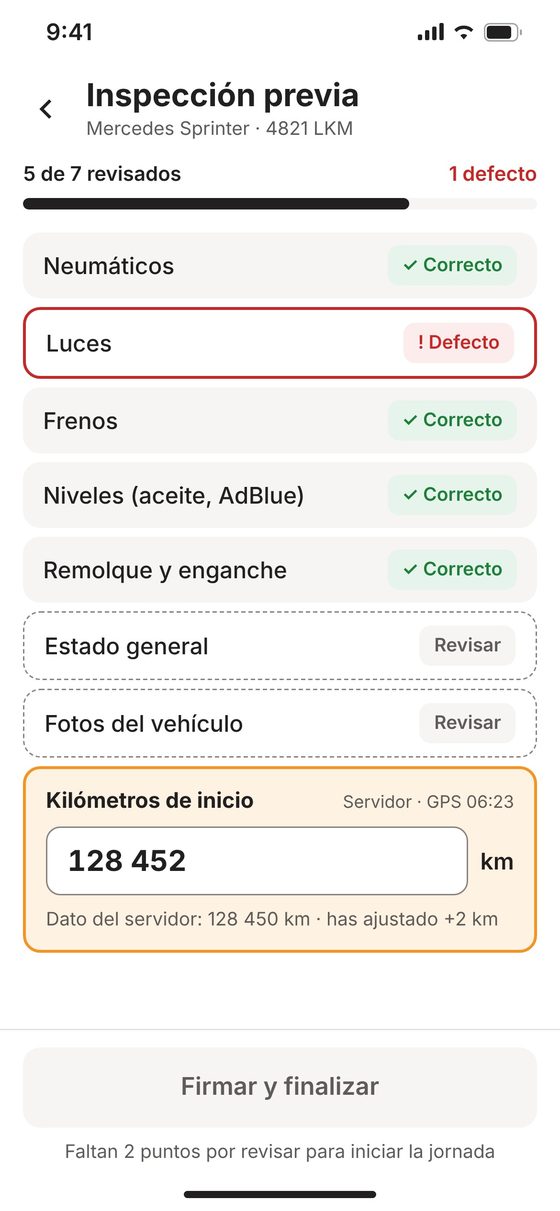
Digital pre-trip inspection
Pre-trip checklist with defects, notes and photos. No inspection, no start of shift.
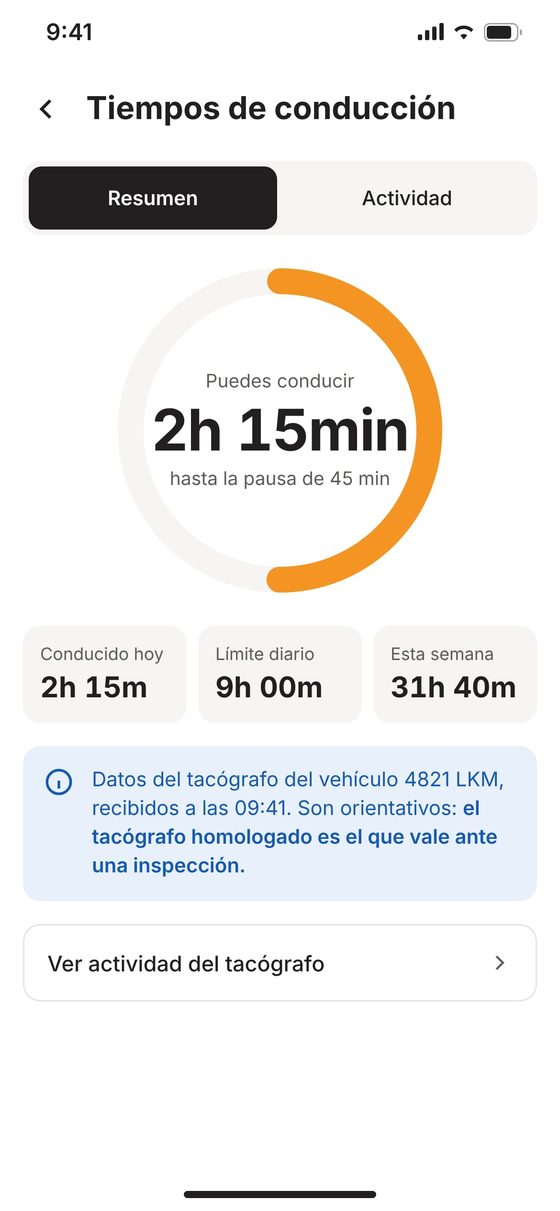
Hours of Service
Time until the next break, daily and weekly driving, with the time of the last reading.
Documents on hand
DOT inspection, insurance, registration, CDL, hazmat, eBOL and receipts, with expiration alerts.
Incidents and SOS
Breakdown, accident, delay or theft, with photos and location. Emergency button that calls 133.
Messages with dispatch
Chat with quick replies and voice dictation, so nobody types while the truck is moving.
Works offline
Everything is saved on the phone and sent automatically when the signal returns, with no duplicates.
Calculate how many admin hours you save each month
Every call asking “which truck are you taking?”, every paper report someone has to re-enter and every document that has to be tracked down costs time, for the driver and for the office. Adjust the numbers to your fleet.
Your fleet
Minutes saved per driver per day
Where you save (US$ per month)
Rough estimate. The starting values are an example for a fleet of 10 drivers, not real customer data: replace them with your company’s numbers.
The day starts with the right vehicle and verified mileage
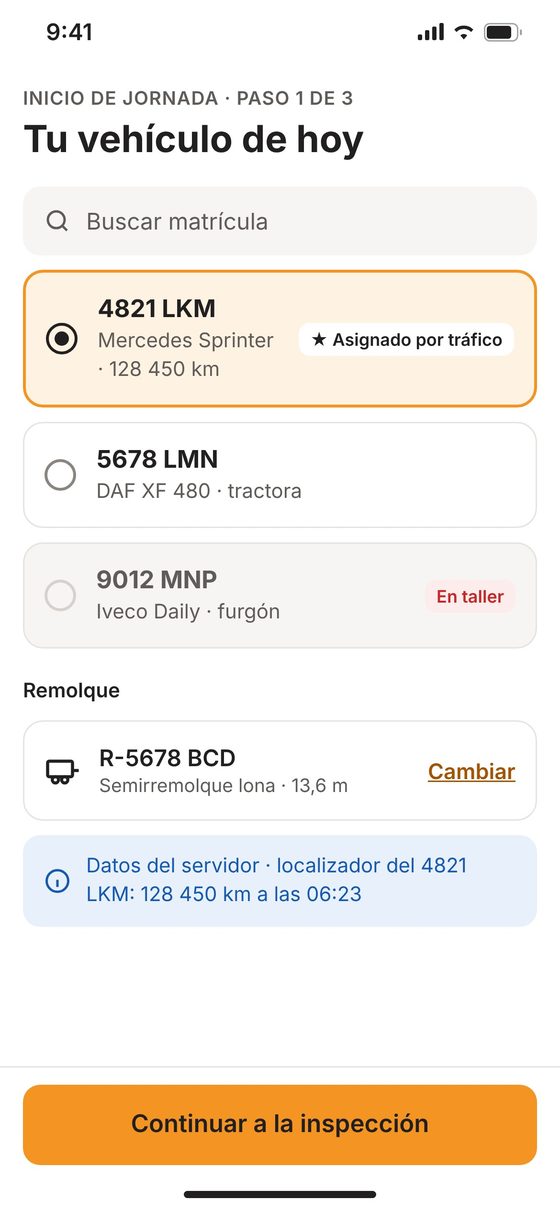
1Vehicle
Assigned by dispatch, with its license plate, model and the latest odometer reading from the tracker.
2Inspection and mileage
Tires, lights, brakes, fluid levels, trailer… Each defect with a note and photo. Mileage is pre-filled: the driver confirms or corrects it.
3Start
Until a vehicle is selected and the inspection is complete, the start button stays disabled. Then come the day’s route and the next stop.
If the driver enters less mileage than the tracker, or more than 30 miles above it, the app asks why. Your system gets both numbers, the driver’s and the GPS reading, so you can review them.
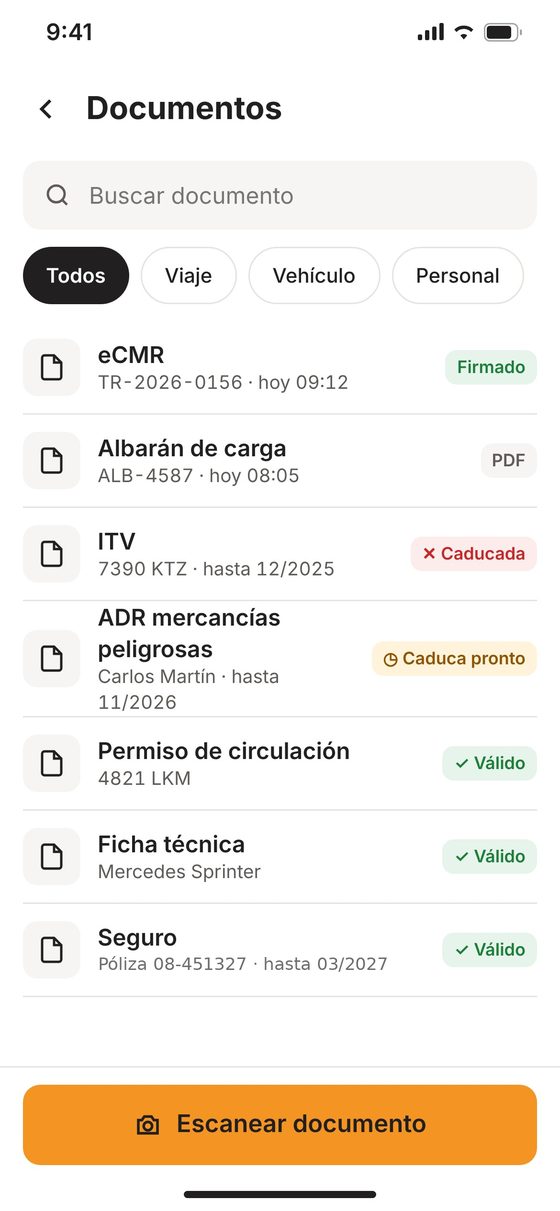
Hours of Service and paperwork, always in view
How long they can drive until the next break, and how much they’ve driven today and this week. Plus every trip, vehicle and driver document, with its status.
- HOS dataPulled from the vehicle’s tachograph/ELD, with the time of the reading. For reference only: the certified device is what counts during an inspection, and the app says so.
- Documents with expiration dateseBOL, delivery receipts, DOT inspection, insurance, spec sheet, registration, CDL and hazmat: valid, expiring or expired.
- Scan with the cameraThe driver snaps a photo of a new document and it’s saved to the trip.
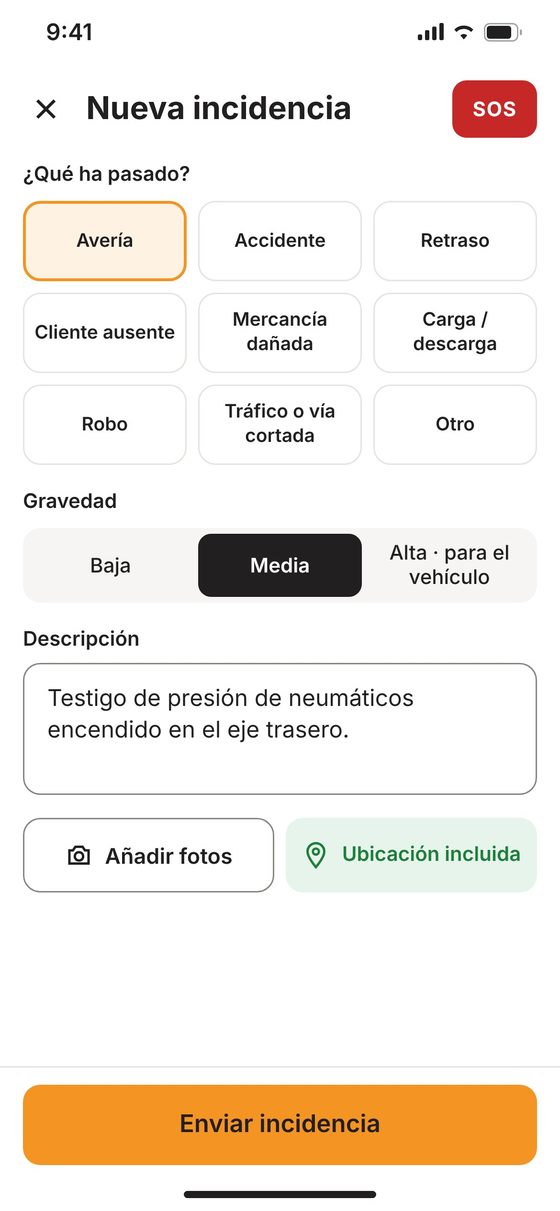
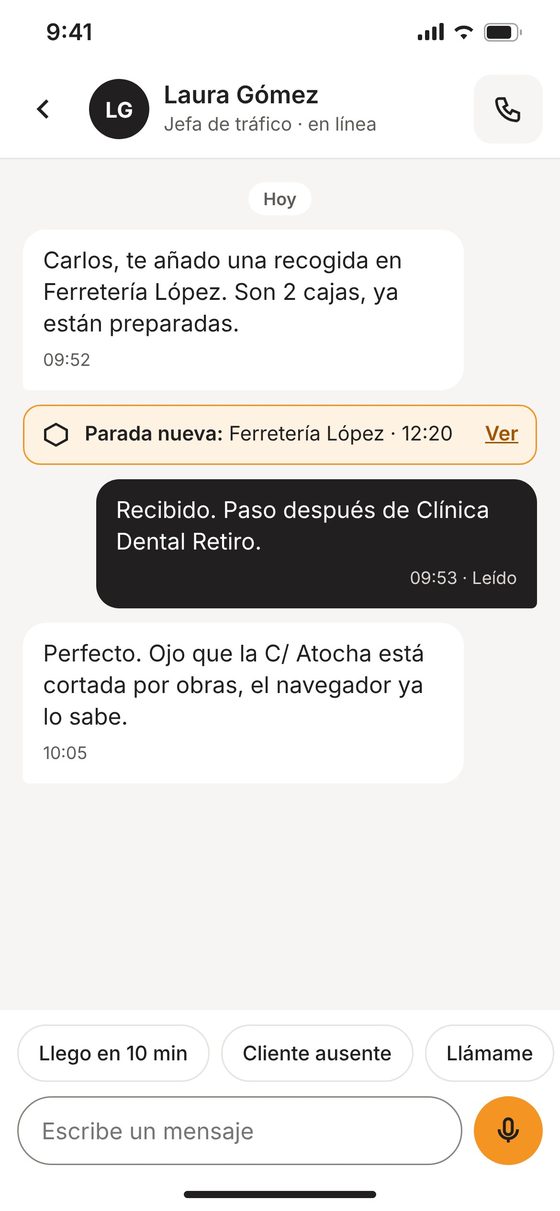
When something happens on the road, dispatch knows right away
Incidents backed by evidence, messages that don’t distract and an emergency button always within reach.
- Incidents with evidenceType, severity, description, photos and location. If the breakdown stops the vehicle, it’s flagged as high severity.
- Distraction-free messagingQuick replies (“There in 10 min”, “Customer not home”) and voice dictation. New stops arrive as notifications.
- EmergenciesPressing and holding the SOS button calls 133 and alerts dispatch with the driver’s location.
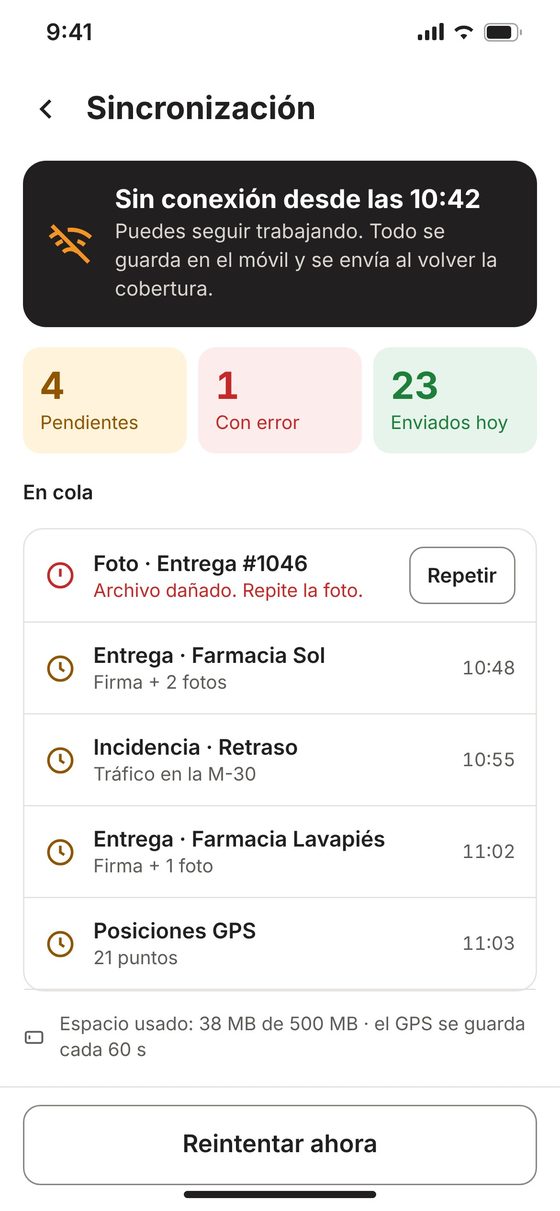
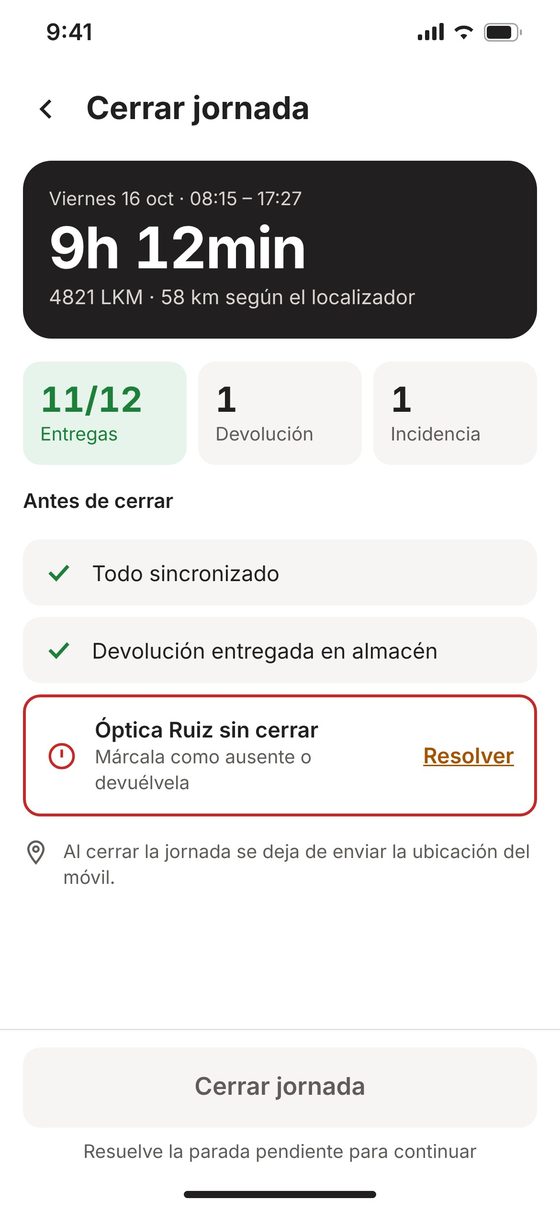
No signal at the port or in the industrial park? Nothing gets lost
The route, the shift and the documents stay saved on the phone. And the shift is closed out with server data, not data from the phone.
- Works offlineDeliveries, inspections and incidents are queued and sent automatically when the signal returns, in order and with no duplicates.
- Daily mileage from the trackerYour server calculates mileage using the vehicle’s tracker.
- No loose ends at close-outIf any stop is still unresolved, the app won’t let the driver close out and shows which one.
Built for real fleets
One app for truck drivers, van drivers or mixed fleets. Each company turns on the features it needs.
For the dispatcher
- Which vehicle each driver has and its starting mileage
- Inspections with defects, notes and photos
- Incidents as they happen, with location
- Daily mileage calculated by the tracker
For the driver
- One app for the whole shift
- Big buttons and clear steps
- In their own language, from five options
- Keeps working with no signal
iOS and Android
One app for your whole team, on personal phones or company devices.
Five languages
Spanish, English, French, Portuguese and Italian. Everyone picks theirs with a flag.
Privacy by design
The phone’s location is only used while a shift is open and stops when it’s closed. The vehicle tracker remains the main source.
Demo mode
“Demo access” button: a full shift with sample data, without touching your data. Ideal for training new hires.
How we get started
Demo
We walk you through the app in demo mode, on your phone, in 15 minutes.
Pilot
A trial with a few drivers and vehicles from your fleet, connected to your tracker.
Rollout
We onboard the rest of your team and tailor the checklist and documents to your operation.
Questions about the Driver APP
Do I need Vigilo GPS trackers?
The app uses data from the vehicle’s tracker (odometer, location and daily mileage). We’ll help you figure out how to connect it to your fleet.
Does it work with no signal?
Yes. Everything is saved on the phone and sent automatically, in order and with no duplicates, when the signal returns.
Does the HOS data replace the tachograph/ELD?
No. It’s for reference only and the app says so on screen: the certified device is what counts during an inspection.
Can drivers use their personal phone?
Yes, on iOS and Android. The phone’s location is only used while a shift is open and stops as soon as it’s closed.
What languages is it available in?
Spanish, English, French, Portuguese and Italian. Each driver picks their own.
How are drivers trained?
With demo mode: a full shift with sample data, without touching your data or the server.
Want to see it with your fleet?
We’ll walk you through the app in demo mode and set up a trial with your vehicles and drivers.